脚本
Mindustry 使用 . Java 为mod脚本. 脚本使用 js 扩展并置于 scripts/ 子目录.
执行从命名的文件开始 main.js。 。 。 。 其它脚本文件可以被主文件导入到 require("script_name")。 。 。 。
典型的设定是这样的:
脚本/主要js数字 :
require("blocks");
require("items");
脚本/块.js数字 :
const myBlock = extend(Conveyor, "terrible-conveyor", {
  // various overrides...
  size: 3,
  health: 200
  //...
});
脚本/项目.js数字 :
const terribleium = Item("terribleium");
terribleium.color = Color.valueOf("ff0000");
//...
实例
倾听事件
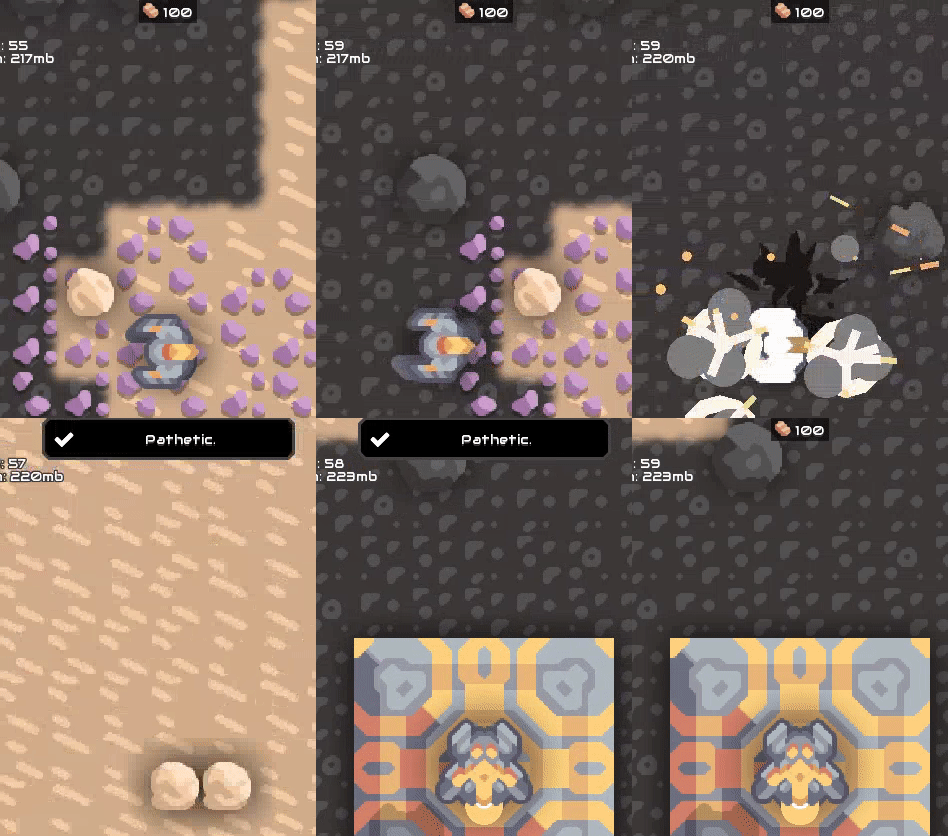
// listen for the event where a unit is destroyed
Events.on(UnitDestroyEvent, event => {
  // display toast on top of screen when the unit was a player
  if(event.unit.isPlayer()){
    Vars.ui.hudfrag.showToast("Pathetic.");
  }
})
查找事件最简单的方法是查看源文件: Mindustry/blob/master/core/src/mindustry/game/EventType.java (中文(简体) ).
显示对话框
const myDialog = new BaseDialog("Dialog Title");
// Add "go back" button
myDialog.addCloseButton();
// Add text to the main content
myDialog.cont.add("Goodbye.");
// Show dialog
myDialog.show();
播放一些自定义声音
播放自定义音频很容易,前提是您将您的音效剪辑存储为 .mp3 或者说 .ogg 文档中 /sounds 目录。
举个例子,我们已经储存了 example.mp3 时间 /sounds/example.mp3。 。 。 。
使用 lib 装入声音
脚本/alib.js数字 :
exports.loadSound = (() => {
    const cache = {};
    return (path) => {
        const c = cache[path];
        if (c === undefined) {
            return cache[path] = loadSound(path);
        }
        return c;
    }
})();
脚本/主要js数字 :
const lib = require("alib");

Events.on(WaveEvent, event => {
    // loads example.mp3
    const mySound = lib.loadSound("example");
    // engine will spawn this sound at this location (X,Y)
    mySound.at(1, 1);
})
//TODO 测试这些并添加更多实例